

How to Connect Your Traveloka Booking to AirAsia BIG Account
Follow these steps before submitting your refund request

Click on "Login/Signup"
Access your AirAsia BIG Account by clicking on Login/Signup.
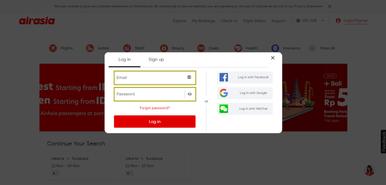
Fill in the “Email Address and Password”
Enter the email address and password for your AirAsia BIG Account. Click on the right side if you want to use the single sign-on (SSO).

Click on "My Bookings"
Open My Bookings page by clicking the tab on the top of the menu bar.
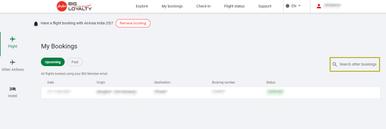
Click on "Search Other Bookings"
To find your booking, click on the Search other bookings box on the right side of the page.
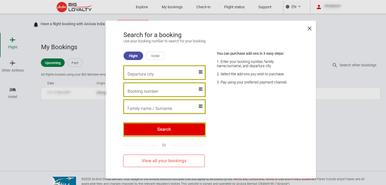
Complete the Details
Enter the departure city, booking number, and last name/ surname. Please fill the booking number field using PNR Code, which you can find in My Bookings.
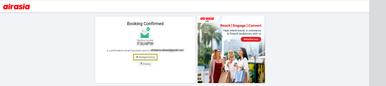
Click on "Manage Booking"
Click on Manage booking to continue the process.
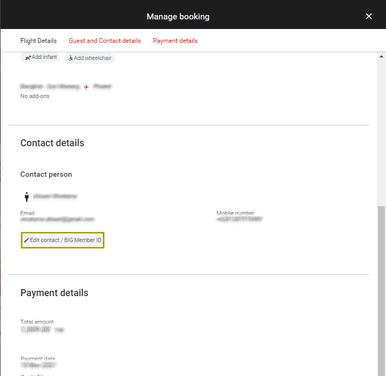
Click on "Edit Contact/ BIG Member ID"
Click on Edit contact / BIG member ID in the contact details section.
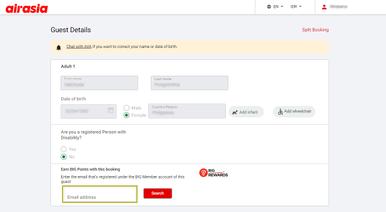
Fill in the “Email address”
Enter this field with the email address used for your AirAsia BIG Account and click on Search. After successfully finding your account, your AirAsia BIG ID will show up.
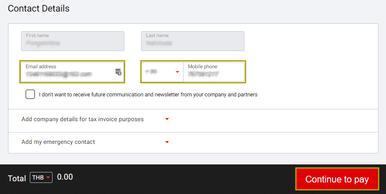
Fill in the "Email address and phone number"
Enter this field with the email address and mobile phone number used for your AirAsia BIG Account. Then click on Continue to pay. Your Traveloka Booking has successfully connected to AirAsia BIG Account.
Terms & Conditions
- Lion Air Group’s test facilities are operated based on recommendations given by the Task Force for the Acceleration Handling of Covid-19 and the Ministry of Transportation.
- Lion Air Group’s COVID-19 PCR test service is only available for passengers who have purchased a Lion Air Group’s (Batik Air, Lion Air, Wings Air) flight ticket.
- Passengers are responsible to check the latest updates on their travel requirements, as informed by the national and regional authorities (in both their departure and arrival airports). Lion Air Group and Traveloka will not be responsible should passengers fail to meet the requirements and not be allowed to travel.
- Passengers are responsible to arrange their test schedule. Lion Air Group and Traveloka will not be responsible should passengers fail to get the PCR test result in time for their departure.
- Lion Air Group and Traveloka do not guarantee the passenger’s eligibility to travel. The decision to onboard a passenger lies solely with the airline and officials at the airport.
- Lion Air Group’s COVID-19 PCR test service is refundable.
- Lion Air Group reserves the right to change the terms and conditions without prior notice.


