


Does this cruise look interesting?
Get more details from our expert and see if this is a match for you.
Chat with us



Excited to go on a cruise? Get your tickets on Traveloka app
Scan the QR code to download the app



How to Book a Cruise Trip on Traveloka

1. Download Traveloka
Cruise tickets are only available on Traveloka app for now. Make sure to download the app and create an account to book your tickets.

2. Find Cruises
To find a cruise, tap the Cruises icon on Traveloka homepage. Can't find it? Try typing 'Cruises' in the search field. It should appear in no time.

3. Explore Cruise Options
Browse cruise options by entering departure location, destination, sailing date, and other details. If you find the cruise that piques your interest, tap it to see its details.

4. Book Your Tickets
After reviewing the itinerary, onboard activities, and other details and you think you’ve found the right cruise, pick the room that suits your need and book the tickets.
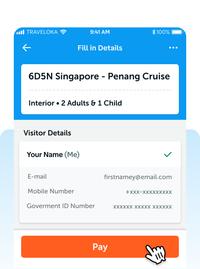
5. Complete Your Booking
After entering the details of all passengers, choose your preferred payment method. If you have a promo code, you can apply it to get a discount. Complete your payment and your tickets are booked!

6. Manage Your Booking
We understand that things don't always go as planned. If something prevents you from going on the cruise, you can always request a refund. Our customer service is ready to help you 24/7.
Why You Need to Book Your Cruise on Traveloka

Competitive Price
Get the best cruise price with exclusive promos on Traveloka. Save more, enjoy more!

Multi-Payment Methods
Easily pay your cruise with any payment method you prefer for a seamless booking experience.

Refundable Booking
Can’t make it to your cruise? #DontWorryNoRugi! Contact our Customer Service to request a refund per cruise line policies.

24/7 Customer Service
Chat or call us when you face any issues with your booking. We're always ready to help you.

Ready to enjoy your cruise trip?
Get your ticket now on Traveloka app!
Chat with us