


Easy Reschedule for Flight
Simple and fast. Save your time with Easy Reschedule and avoid hassle. Do it all in Traveloka with only a few steps.
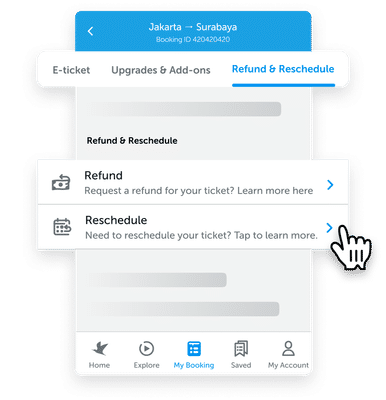
Open your e-ticket
Go to My Booking in your Traveloka App, then open the e-ticket of the desired flight. Tap Refund & Reschedule tab at the top then select Reschedule.
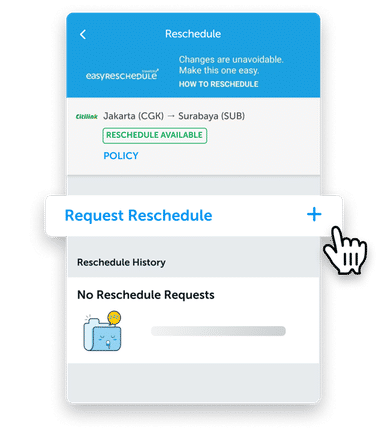
Select Request Reschedule
Tap on Request Reschedule to begin the process.
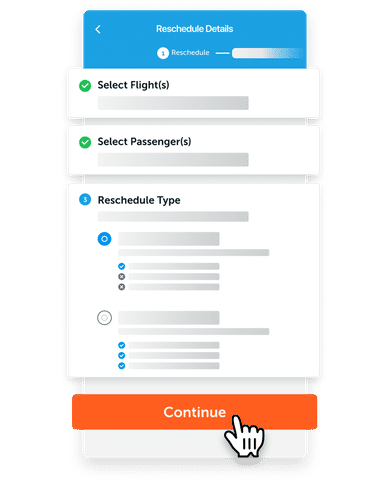
Fill in your reschedule details
Select the flight and passenger(s) you want to reschedule. Then, select your reschedule type and tap on Continue.
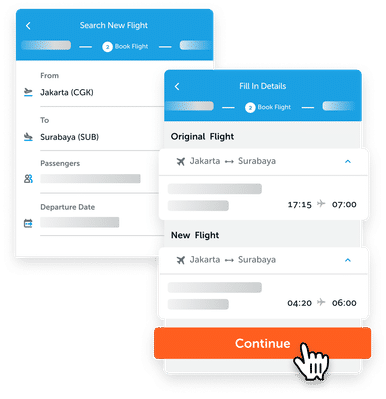
Choose Your New Flight
Search for a new flight by filling the details, select the flight you want then continue.
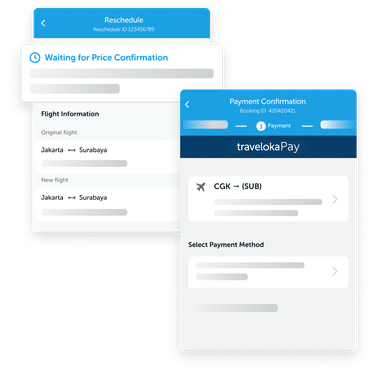
Complete Your Payment
Confirm the details and extra charges for your Reschedule and complete the payment before the time limit.
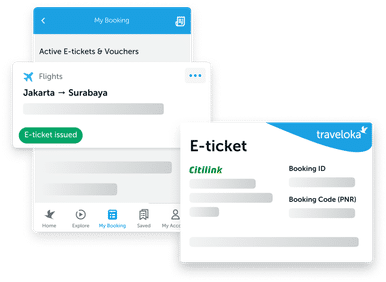
Receive Your New E-ticket
After your Easy Reschedule process is completed, the new e-ticket can be viewed in My Booking and also will be sent to your email.
How to Check Flight Reschedule Policy
Contents :
When Searching for a Flight
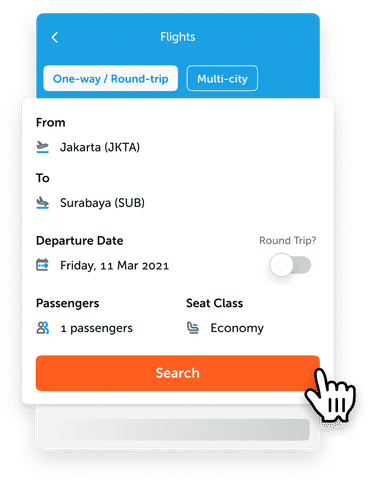
Search for flights in Traveloka
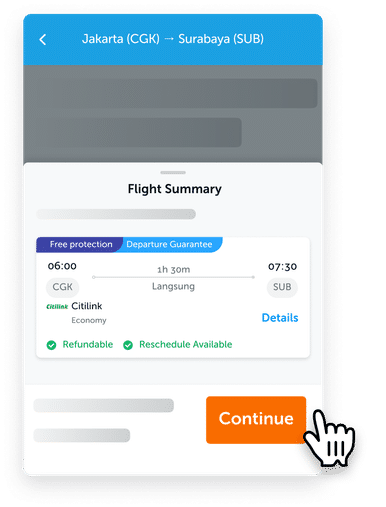
Select the flight you want, then tap the Continue button.
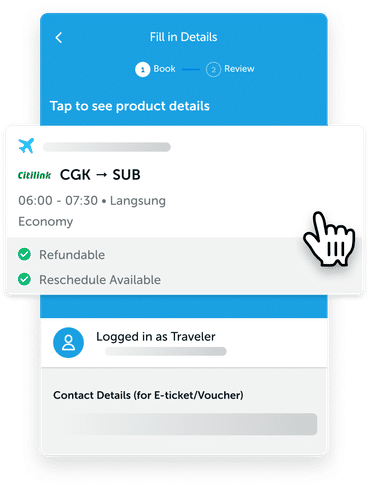
Tap on the flight card at the top (under “Tap so see product details”).
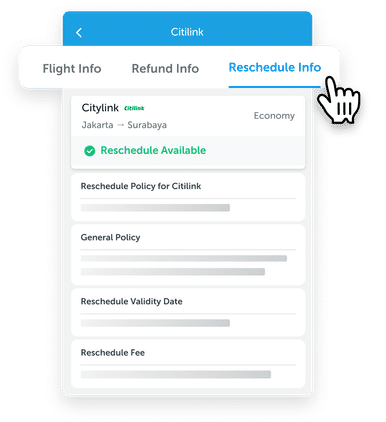
Find the Reschedule Info tab at the top then tap it to check the flight’s Reschedule General Policy, Validity Date, and Reschedule Fee.
After purchase is made
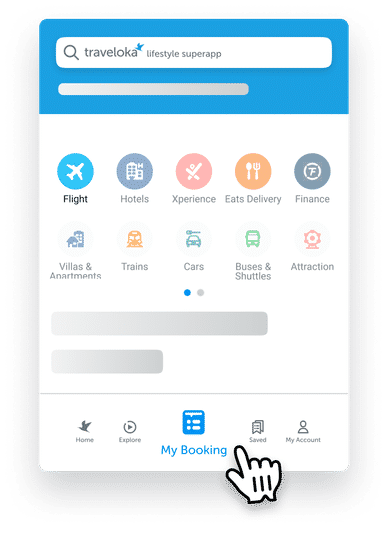
Go to My Booking in your Traveloka App. You can find it in the bottom middle area.
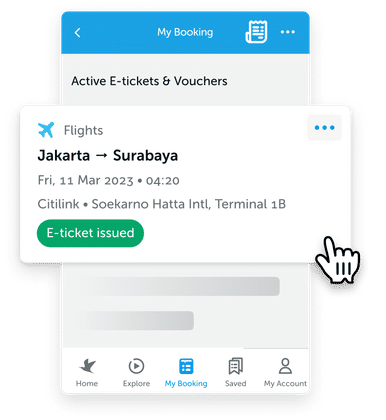
Select the flight/booking that you want to see the policy.
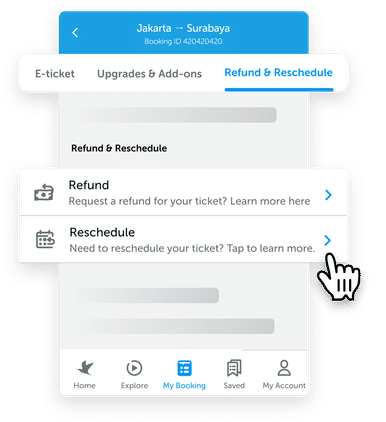
Tap the Refund & Reschedule tab on the top, then select Reschedule.
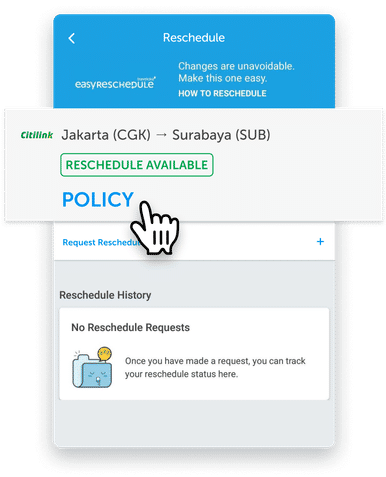
Tap POLICY under the flight you want.
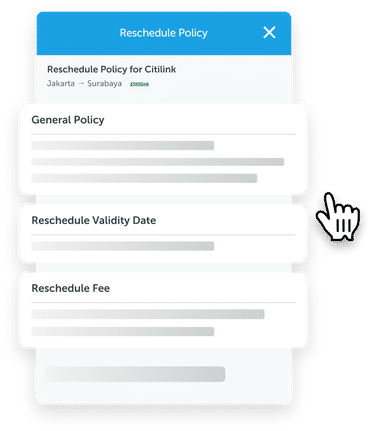
There you can see the Reschedule General Policy, Validity Date, and Reschedule Fee.
After your flight departure has passed
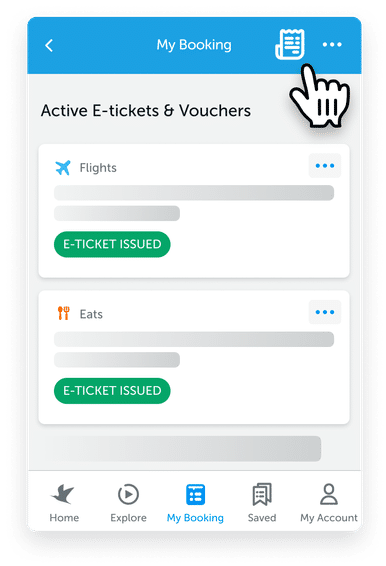
If your flight’s departure date has passed, you have to tap the bill icon on the top right corner of My Booking page.
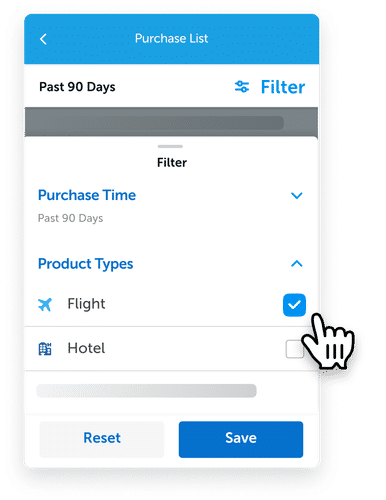
This is the purchase list page. Find your past flights by tapping Filter on the top right area then choosing Product Type - Flight.
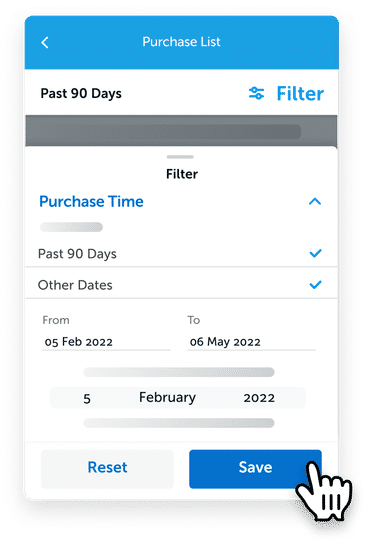
Select Purchase Date and set it to your desired date range, then tap Save.
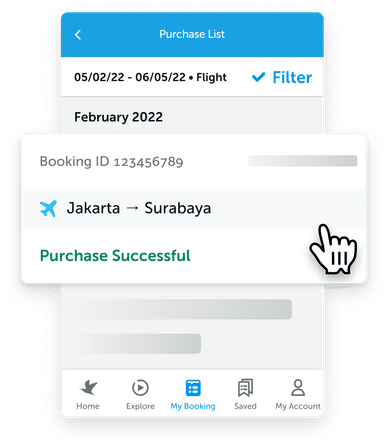
On the list of purchases shown, select the booking you want.
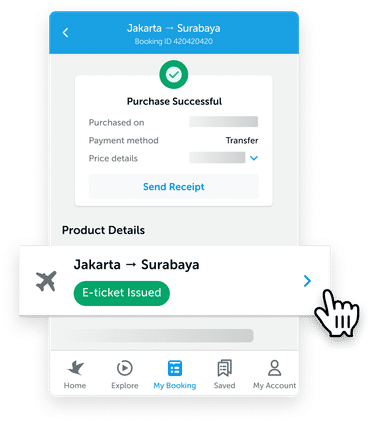
Select the flights under Product Details.
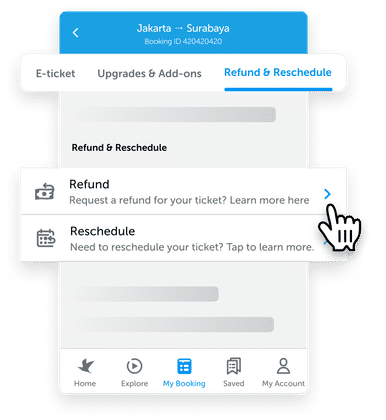
Tap on the Refund & Reschedule tab at the top, then select Reschedule.
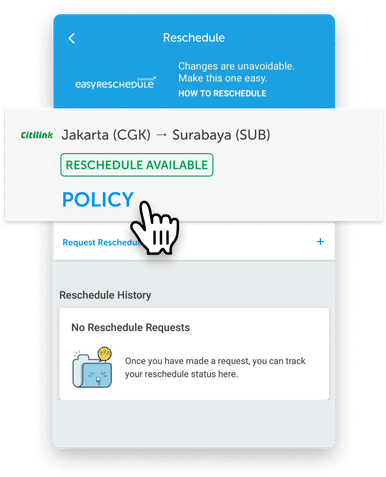
Tap POLICY for the flight you want
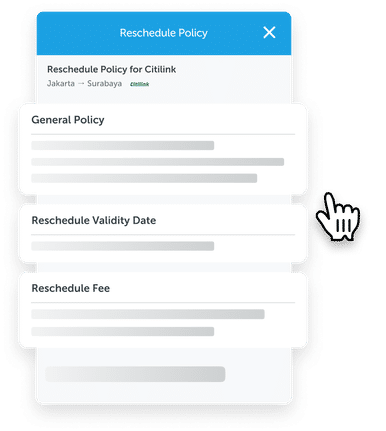
There you can see the Reschedule General Policy, Validity Date, and Reschedule Fee.
You can check a flight’s reschedule policy when making a booking for your flight or after booking is made, both in app and desktop. See how below:
Via App
When Searching for a Flight
- Select Flights on your Traveloka App and enter your flight details. Then, tap Search.
- Select the flight(s) you want and review the summary of your trip/booking. Then, tap on Select/Continue.
- After you continue, tap on the flight card above (under Tap to see product details).
- Then, tap on the Reschedule Info tab above. There, you should see the reschedule policy of your flight.
After Flight Booking is Made
- Open your Traveloka App and tap on My Booking, located at the bottom center of the homepage.
- Then, tap on the flight you want to see the reschedule policy of. If your departure date has passed, you would have to tap on the bill icon on the top right of the page first.
- After that, tap on the Refund & Reschedule tab at the top. Then, tap on Reschedule. There, you will see the reschedule policy for your flight.
Via Desktop
When Searching for a Flight
- Select Flights on the Traveloka homepage.
- Enter your flight details and press Search Flights.
- Select the flight you want first.
- Then, press on Flight Details and press on the Reschedule tab. There, you will see the reschedule policy for your flight.
After Flight Booking is Made
- Go to the Traveloka homepage and press My Booking, located at the top of the page. If you can’t find your flight there, it means that your departure date has passed and you would have to press on Purchase List.
- Select the flight you want to see the reschedule policy of by pressing on Details.
- Then, press Request Reschedule to see the reschedule policy of your flight. Don’t worry, your reschedule request hasn't started when you press Request Reschedule.
There are two reasons why your reschedule costs have gone up:
- There are only a few seat(s) left on your new flight
If this is the case, this will be reflected through the Fare Difference price.
Ticket prices usually increase when there are only a few seat(s) left on the plane. This can be caused due to the date, time, or flight you chose are highly sought out by other travelers as well.
Another reason could also be because the new flight date/time you chose is very close to the date/time you made your reschedule, which makes the seating more limited.
- You requested a reschedule very close to the original departure date
If this is the case, this will be reflected through the Airline Reschedule Fee price.
This happens because some airlines charge a higher reschedule fee if you request a flight close to the departure date.
Easy Reschedule is subject to Traveloka Service Fee. Additional charges from airlines may also apply.
What is an open ticket?
An open ticket is almost similar to rescheduling your ticket, but with more flexibility. While rescheduling requires you to set your new date up front, an open ticket allows you to choose the dates later, hence the “open” status. An open ticket has a longer validity period, although the specifics may vary among airlines. When deciding on your new travel dates, make sure it is within your open ticket’s validity period.
How to request for an open ticket?
Contact our customer service via My Inbox on Traveloka App and provide your Traveloka Booking ID (9-digit numbers).
Please note that not all airlines provide the open ticket option. To check your airline’s detailed policy, see the Airline Status & Policies tab.
What is a reroute?
While a reschedule requires you to change your travel dates, a reroute means you’re requesting changes for your point of origin, your destination, and/or your transit city. Change fee and fare difference might apply depending on your airline.
How to request for a reroute?
Contact our customer service via My Inbox on Traveloka app and provide your Traveloka Booking ID (9-digit numbers).
Please note that not all airlines provide the reroute option. To check your airline’s detailed policy, see the Airline Status & Policies tab.
Easy Reschedule for AirAsia Berhad - Malaysia
Valid for tickets
- Original Date of Issue: 03/06/2020 until 15/6/2022
- Original Date of Travel: 03/06/2020 until 15/6/2022
- New Date of Travel: until 30/6/2022
- Reschedule/change fee will be waived
- Any fare differential between original and new ticket must be paid by customer
- This should be done 48 hours before your original date of travel
*) Flight changes made from 8 March 2022 onwards will be subjected to fuel surcharge.
Easy Reschedule for AirAsia Indonesia (QZ)
Valid for tickets
- Original Date of Issue:1/6/2022 until 15/6/2022
- Original Date of Travel:1/6/2022 until 15/6/2022
- New Date of Travel: until 30/6/2022
- Reschedule/change fee will be waived
- Any fare differential between original and new ticket must be paid by customer
- This should be done 48 hours before your original date of travel
Easy Reschedule for Thai AirAsia (FD)
Valid for tickets
- Route : Domestic Flights
- Original Date of Issue:10/01/2022 until 30/04/2022
- Original Date of Travel:10/01/2022 until 30/06/2022
- New Date of Travel: until 30/06/2022
- Reschedule/change fee will be waived
- Any fare differential between original and new ticket must be paid by customer
- This should be done 48 hours before your original date of travel
Easy Reschedule for Thai AirAsia (XJ)
Valid for tickets
- Original Date of Issue:01/01/2020 until 30/06/2022
- Original Date of Travel:01/04/2022 until 31/12/2022
- New Date of Travel: until 25/03/2023
- Reschedule/change fee will be waived
- Any fare differential between original and new ticket must be paid by customer
- This should be done 48 hours before your original date of travel
Easy Reschedule for Philippines AirAsia (Z2)
Valid for tickets
- Original Date of Issue:30/06/2020 until 15/06/2022
- Original Date of Travel:30/06/2020 until 15/06/2022
- New Date of Travel: until 30/06/2022
- Reschedule/change fee will be waived
- Any fare differential between original and new ticket must be paid by customer
- This should be done 12 hours before your original date of travel
*) Flight changes made from 14 March 2022 onwards will be subjected to fuel surcharge in accordance to the guidelines set by the Civil Aeronautics Board.
Easy Reschedule for All Nippon Airways
Valid for tickets
- Market sales Indonesia & Market sales Malaysia
- Original Date of Issue: until 28/08/2020
- Original Date of Travel:26/02/2020 until 31/10/2020
- New Date of Travel: either before 31/03/2021 or Within validity ticket (12 months from date of issued original ticket) - whichever is earlier
- Waiver for reschedule/change fee permitted for one time only
- Change fee and different fare will be waived for flight within the same seatclass & cabin with the original ticket.
- No show fee is not applicable for waiver
Easy Reschedule for American Airlines
Valid for tickets
- Routes: All routes
- Original Date of Issue: 01/03/2020 – 31/01/2022
- New Date of Travel: up to 31/12/2022
- Reschedule/change fee will be waived
- Waiver for reschedule/change fee permitted for one time only
- Any fare differential between original and new ticket must be paid by customer
- This can be done by submitting reschedule via Traveloka Apps
- This should be done before your original date of travel
Easy Reschedule for Cathay Pacific
Valid for tickets
- All route
- Date of Ticket Issuance : 03/09/2020 - 31/12/2021
- Unlimited ticket changes up to 31/12/2021, one additional free change at any time after 31/12/2021
- New travel date : before 31 December 2022
- Applicable to all fares, including tickets that have been upgraded to a higher cabin class with Asia Miles, but excluding redemption tickets, group tickets, and Cathay Pacific holiday packages.
- Booking changes must be made before original departure date. Not applicable to no-show ticket
Easy Reschedule for Emirates
Valid for tickets
- Routes: All routes
- Original Date of Issue: until 30/09/2020
- Original Date of Travel: until 31/03/2021
- New date of travel: Within validity ticket (12 months from date of issued original ticket)
- Reschedule/change fee will be waived
- Change fee and different fare will be waived for flight within the same seatclass & cabin with the original ticket.
- Different taxes and surcharges will be collected
- No show fee will be waived
Valid for tickets
- Routes: All routes
- Original Date of Issue: until 30/09/2020
- Original Date of Travel: until 31/03/2021
- Another option that we can provide to you is Open Ticket. By doing this you are cancelling your original itinerary and giving it OPEN status.
- Your new date of travel should be 760 days validity period from original date of issued.
- This ticket will then be accepted at face / residual value as payment for a new ticket for any date/flight
- Permitted for reschedule and reroute
- Penalty fee will be waived
- Change fee and different fare will be waived for flight within the same seat class & cabin with the original ticket.
- Different taxes and surcharges will be collected
Valid for tickets
- Routes: All routes
- Original Date of Issue: until 30/09/2020
- Original Date of Travel: until 31/03/2021
- Reroute / change fee will be waived
- Any fare differential between original and new ticket must be paid by customer
- Different taxes and surcharges will be collected
- No show fee will be waived
Easy Reschedule for Etihad
Valid for tickets
- Date of Issuance : before 10 March 2022
- Validity ticket 24 months after original issued date.
- If the ticket is still valid, customer can request reschedule on 31 May 2022 at the latest
- New Travel Date : on/before 30 September 2022 (complete all the travel)
- Reschedule/change fee will be waived
- Fare differential between original and new ticket will be waived only if the ticket is cancelled by the airlines or impacted by country restriction (involuntary change)
- Fare differential between original and new ticket must be paid by customer for voluntary change
- No show fee is not applicable for waiver
- Rerouting is permitted
Easy Reschedule for Japan Airlines
Valid for tickets
- Travel Date : 10 February 2022 - 29 October 2022
- Route : To/From/Transit Japan
- New Date of Travel : 28 April 2021 - 5 November 2022 (Complete Journey)
- Ticket should be rebooked with the Same Booking Class with Original Booking
Valid for tickets
- Travel Date : 10 February 2022 - 29 October 2022
- Route : To/From/Transit Japan
- Another option that we can provide to you is Open Ticket. By doing this you are cancelling your original itinerary and giving it OPEN status.
- This option is for you that still do not know your future travel plan. It will give you the flexibility to choose the dates later on with a longer validity period.
- When you already have a new travel plan or date of travel, the amount from your original ticket will be transferred to the new ticket and you need to cover the remaining amount.
- This is however is not a refund
- New Date of Travel : 28 April 2021 - 5 November 2022 (Complete Journey)
Easy Reschedule for Nok Air
Valid for tickets
- Updated : 14/01/2021
- Routes: Thailand Domestic Flights
- Original Date of Travel:11/01/2021 until 31/03/2021
- New Reservation : Travel within 30 June 2021 and must be same route
- Allow to change flight without any reservation change fee
- The fare different will be charged (if any)
- The reservation change must be done at least 72 hours before the original departure time, applied for Nok Lite & Nok X-Tra
- Passenger who wish to reschedule, please contact to airline directly on airline https://www.nokair.com
Easy Reschedule for Singapore Airlines and Silk Air
Valid for tickets
- Route : All Route
- Original Date of Issue: 05/03/2020 until 31/05/2022
- Reschedule/change fee will be waived
- Any fare differential between original and new ticket must be paid by customer
- Waiver for reschedule/change fee permitted for multiple changes
- This should be done before expiry date of the original ticket (12 months from original ticket issuance date).
- If the reschedule request is submitted on or before 31 May 2022, the number of free-of-charge booking changes (reschedule) allowed is unlimited.
- If the reschedule request is submitted after 31 May 2022, only a one-time free-of-charge booking change is allowed.
- This can be done by submitting reschedule via Traveloka Apps
Easy Reschedule for Susi Air
Valid for tickets
- Route : All
- Date of Issuance : All
- Date of Travel : All (including Indonesia Lebaran restriction period)
Please refer to ticket condition showed on the e-ticket
How to check your reschedule policy:
- Open your e-ticket via My Booking on Traveloka App.
- Scroll down to the Manage Booking section and select Reschedule.
- See if reschedule is available for your ticket, and tap Policy.
Easy Reschedule for Transnusa
Reschedule
Valid for tickets
- Route : All
- Date of Issuance : All
- Date of Travel : All (including Indonesia Lebaran restriction period)
Please refer to ticket condition showed on the e-ticket
How to check your reschedule policy:
- Open your e-ticket via My Booking on Traveloka App.
- Scroll down to the Manage Booking section and select Reschedule.
- See if reschedule is available for your ticket, and tap Policy.
Easy Reschedule for Trigana Air
Valid for tickets
- Route : All
- Date of Issuance : All
- Date of Travel : All (including Indonesia Lebaran restriction period)
Please refer to ticket condition showed on the e-ticket
How to check your reschedule policy:
- Open your e-ticket via My Booking on Traveloka App.
- Scroll down to the Manage Booking section and select Reschedule.
- See if reschedule is available for your ticket, and tap Policy.
Easy Reschedule for Qatar Airways
Reschedule without any fare difference
Valid for tickets
- All Route
- Ticket Issuance Date : on/after 1 March 2019
- Original Date of Travel : on/before 30 September 2022
Without any fare difference including taxes, fees, charges and surcharges
- Rebook in the same ticketed RBD as original (within the same cabin and OAL) and flights as permitted according to original ticketed fare basis
- Reschedule fee and any difference of fare, taxes, fees, charges and surcharges will be waived ; however, fare, taxes, fees, charges and surcharges difference applies if original ticketed seasonality and/or blackout/travel date is not followed
- Any residual value is non-refundable and non-exchangeable
- No-show condition and no-show penalty will be waived
Reschedule with fare difference
Valid for tickets
- All Route
- Ticket Issuance Date : on/after 1 March 2019
- Original Date of Travel : on/before 30 September 2022
Fare difference including taxes, fees, charges and surcharges
- Reschedule fee will be waived
- New fare basis conditions, including applicable RBD will be applied
- Please requote and collect any applicable difference of fare, taxes, fees, charges and surcharges
- Any fare differential between original and new ticket must be paid by customer
- Any residual value is non-refundable and non-exchangeable
- No-show condition and no-show penalty will be waived
Easy Reschedule for Qantas Airways
Valid for tickets
- Routes: All routes
- Original Date of Issue: until 06/05/2020
- Original Date of Travel: until 31/07/2020
- New Date of Travel: until 31/12/2021
- Reschedule/change fee will be waived
- Waiver for reschedule/change fee permitted for one time only
- Different fares will be waived (1x)
- This can be done by submitting reschedule via Traveloka Apps
- This should be done before your original date of travel
- New Date of Travel: until 31/12/2021
- For Jetstar Flight operated by Qantas, this only eligible if the flight is cancelled by the airline with date of travel from 26/03/2020 until 31/07/2020
Valid for tickets
- Routes: All routes
- Original Date of Issue: until 06/05/2020
- Original Date of Travel: until 31/07/2020
- New Date of Travel: until 31/12/2021
- Another option that we can provide to you is Open Ticket. By doing this you are cancelling your original itinerary and giving it OPEN status.
- This option is for you that still do not know your future travel plan. It will give you the flexibility to choose the dates later on with a longer validity period.
- When you already have a new travel plan or date of travel, the amount from your original ticket will be transferred to the new ticket and you need to cover the remaining amount.
- If you still have the remaining amount even after selecting a new date of travel, the remaining amount cannot be refunded (cannot be cashed).
- This is however is not a refund
- This can be done by contacting our customer service via My Inbox in our Traveloka Apps and requesting for an Open Ticket.
- This should be done before your original date of travel
- When you already have your new date of travel, contact us again via My Inbox and state your Ticket Number when you request the Open Ticket to help us track your request.
- New Date of Travel: until 31/12/2021
- For Jetstar Flight operated by Qantas, this only eligible if the flight is cancelled by the airline with date of travel from 26/03/2020 until 31/07/2020
Valid for tickets
- Routes: All routes
- Original Date of Issue: until 06/05/2020
- Original Date of Travel: until 31/07/2020
- New Date of Travel: until 31/12/2021
- Reroute / change fee will be waived
- Waiver for reroute/change fee permitted for one time only
- Any fare differential between original and new ticket must be paid by customer
- This can be done by contacting our customer service via My Inbox in our Traveloka Apps
- This should be done before your original date of travel
- For Jetstar Flight operated by Qantas, this only eligible if the flight is cancelled by the airline with date of travel from 26/03/2020 until 31/07/2020
Easy Reschedule for Starlux
Valid for tickets
- Routes: All routes
- Original Date of Issue: on/before 31/12/2021
- Original Date of Travel: All date within ticket validity
- Route : All
- Reschedule/change fee will be waived (Free Reschedule Fee)
- Any fare differential between original and new ticket must be paid by customer
- This can be done by submitting reschedule request via Traveloka Apps
Easy Reschedule for Turkish Airlines
Valid for tickets
- Routes: All routes
- Original Date of Issue:21/03/2020 until 31/12/2021
- Original Date of Travel: anytime
- Reschedule/change fee will be waived
- Any fare differential between original and new ticket must be paid by customer
- No show fee is not applicable for waiver
- New Travel/Journey date should be completed up to 31 May 2022
Valid for tickets
- Routes: All routes
- Original Date of Issue:21/03/2020 until 31/12/2021
- Original Date of Travel: anytime
- New travelling dates can be issued according to the ticket validity
- Validity of Ticket can be extended until 31 May 2022 without any penalty
Valid for tickets
- Routes: All routes
- Original Date of Issue:21/03/2020 until 31/12/2021
- Original Date of Travel: anytime
- Reroute / change fee will be waived
- Any fare differential between original and new ticket must be paid by customer
- No show fee is not applicable for waiver
Easy Reschedule for Air France
Reschedule for Involuntary Changes
All passengers affected by cancelled flights due to COVID-19 and passengers covered by a travel ban
Valid for tickets
- Routes: All routes
- Original Date of Travel: anytime
- Original Date of Issue: anytime
New Date of Travel: from 01/12/2020 onward
- This should be done before 31/06/2020
- Reschedule/change fee will be waived
- No show fee is not applicable for waiver
New Date of Travel: on/before 30/11/2020
- This should be done before 31/10/2020
- Reschedule/change fee will be waived
- No show fee is not applicable for waive
Reschedule for Voluntary Changes
Flights has cancellation flights from airlines but not affected due to COVID 19 and travel bans
Valid for tickets
- Routes: All routes
- Original Date of Issue: on/before 21/04/2020 & Original Date of Travel: from 01/09/2020 onward
- Original Date of Issue: from 22/04/2020 onward & Original Date of Travel: anytime
Original Date of Issue: on/before 21/04/2020
Original Date of Travel: from 01/09/2020 onward
- This should be done before 30/06/2021.
- Reschedule/change fee will be waived
- No show fee is not applicable for waiver
Original Date of Issue: from 20/04/2020 onward
Original Date of Travel: anytime
- This should be done before 30/06/2021.
- Reschedule/change fee will be waived
- No show fee is not applicable for waiver
Reroute for Involuntary Changes
All passengers affected by cancelled flights due to COVID-19 and passengers covered by a travel ban
Valid for tickets
- Routes: All routes
- Original Date of Travel: anytime
- Original Date of Issue: anytime
- New Date of Travel: until 30/06/2021
- Reroute / change fee will be waived
- Any fare differential between original and new ticket must be paid by customer
- No show fee is not applicable for waiver
Reroute for Voluntary Changes
Flights has cancellation flights from airlines but not affected due to COVID 19 and travel bans
Valid for tickets
- Routes: All routes
- Original Date of Issue: on/before 21/04/2020 & Original Date of Travel: from 01/09/2020 onward
- Original Date of Issue: from 22/04/2020 onward & Original Date of Travel: anytime
- New Date of Travel: until 30/06/2021
- Reroute / change fee will be waived
- Any fare differential between original and new ticket must be paid by customer
- No show fee is not applicable for waiver
Easy Reschedule for Citilink
Valid for tickets
- Route From/To : All Domestic Route
- Date of Departure : 25th August 2021 until further notice
- for passenger who do not meet the requirements to fly :
- Change fee and fare difference will be waived as long as the new date of travel outside black out date period (22 December 2021 to 5 January 2022)
- Waiver change fee and fare difference permitted for one time only
- Reschedule can be done by submitting reschedule via Traveloka Apps
Valid for tickets
- For passenger that tested positive of COVID-19 (up to 7 days after departure date)
- Reschedule/change fee will be waived
- Any fare differential between original and new ticket must be paid by customer
- Reschedule can be done by contacting airline on +62-31-293-1100 or +62-804-1-08-08-08
- Normal reschedule rules will apply
- Click here to get more information
- This can be done by submitting reschedule via Traveloka Apps
Easy Reschedule for Garuda Indonesia
Valid for tickets
- Original Date of Issue:24/04/2020 until 30/06/2022
- Original Date of Travel:24/04/2020 up to 1 year from original date of ticket issued
- New Date of Travel: until 31/12/2023
- Waiver for reschedule/change fee permitted for three times only
- Any fare differential between original and new ticket must be paid by customer
- This should be done before 31/12/2022.
- No show fee is not applicable for waiver
- Reschedule can be done via manage booking on Traveloka Apps
Valid for tickets
- For passenger that tested positive of COVID-19 before/after departure date
- Eligible for free reschedule , maximum three times (3x) with T&C Applied
Easy Reschedule for Lion Air, Batik Air, and Wings Air
Valid for tickets
- For passenger that tested positive of COVID-19 before departure date
- Eligible for reschedule, reschedule fee and any fare differential between original and new ticket must be paid by customer
Valid for tickets
- Starting from 01/07/2020, all refund & reschedule submission follow the normal rules
- Routes: All routes
- Normal reschedule rules will apply
- Click here to get more information
- This can be done by submitting reschedule via Traveloka Apps
Easy Reschedule for Malaysia Airlines
Valid for tickets
- Original Date of Issue : on/before 30/05/2020
- Original Date of Travel : 1/1/2020 until 29/3/2021
- This should be done before 30/05/2022.
- New Date of Travel: on/before 31/12/2022
- Change fee and different fare will be waived for flight within the same seatclass & cabin with the original ticket.
- Any fare differential between original and new ticket must be paid by customer
Valid for tickets
- All passengers affected by rescheduled/cancelled flights due to COVID-19 and passengers covered by a travel ban
- Original Date of Issue: on/before 30/05/2020
- Original Date of Travel:1/1/2020 until 29/10/2022
- This should be done before 30/05/2022.
- New Date of Travel: on/before 31/12/2022
- Change fee and different fare will be waived for flight within the same seatclass & cabin with the original ticket.
- Any fare differential between original and new ticket must be paid by customer
Easy Reschedule for Philippine Airlines
Valid for tickets
- Effective per November 29, 2021 - UFN
- Irregular changes include :
- Tickets affected by flight cancellation by airline
- Tickets affected by schedule changes by airline of two (2) hours and beyond.
- Tickets affected by schedule changes by airline on either of the connecting segment that are less than two (2) hours, and will not be able to meet the standard minimum connecting time.
- Reschedule fee will be waived
- Reschedule to an earlier flight within 3 days or to another flight with available space within 60 days after the original flight
- No additional charge on the same Booking Class
- Reschedule must be submitted within the period of validity of the ticket or within thirty (30) days from date of ticket expiry (whichever comes first)
Valid for tickets
- Applied for travel date 1 July - 31 October 2021.
- All passengers affected by cancelled flights due to COVID-19 and passengers covered by a travel ban
- (e.g. community quarantine, denial from thermal screening, mandatory quarantine/self isolation, etc. Not included passengers with incomplete travel requirements : ie. Failure to present travel pass, medical certificate, and/or negative COVD-19 test results)
- Reschedule is allowed with waiver of change fee and fare difference on the same cabin and Booking class.
- Valid for travel within sixty (60) days from the affected flight date provided the selected date is within ticket validity or within 30 days from ticket expiry (ticket expiry is 1 year from ticket issuance)
Easy Reschedule for Sriwijaya Air & Nam Air
Valid for tickets
- Date of Departure : 24 December 2021 - 02 January 2022
- Route : All Domestic Route
- for passenger who do not meet the requirements to fly and get denied at airport :
- Change fee and different fare will be waived as long as the new date of travel within 30 days of the original date travel and with the same seatclass & cabin with the original ticket
- If the price of the new ticket is greater than the old ticket, the excess funds from the previous ticket will not be refunded
- Reschedule can be done by submitting via Traveloka App
Valid for tickets
- For passenger that tested positive of COVID-19 before departure date
- Eligible for reschedule. Reschedule will be waived, any fare differential between original and new ticket must be paid by customer
Valid for tickets
- Original Date of Travel: from 09/01/2021 onward
- Routes: All routes
- for passengers who do not meet the requirements that resulting in passenger departure being refused at the airport (on the spot
- Change fee and different fare will be waived for flight within the same seatclass & cabin with the original ticket.
- This should be done within 30 days after your original date of travel
- Reschedule can be done by submitting via Traveloka App
Reroute for Christmas & New Year Period
Valid for tickets
- Date of Departure : 24 December 2021 - 02 January 2022
- Route : All Domestic Route
- for passenger who do not meet the requirements to fly and get denied at airport
- Any fare differential between original and new ticket must be paid by customer. If the price of the new ticket is higher than the original ticket, the excess funds from the previous ticket will not be refunded
Valid for tickets
- Original Date of Travel: from 09/01/2021 onward
- Routes: All routes
- for passengers who do not meet the requirements that resulting in passenger departure being refused at the airport (on the spot) :
- Any fare differential between original and new ticket must be paid by customer
Easy Reschedule for Thai Vietjet
Valid for tickets
- Original Date of Travel: 1-10 April 2021
- Thai Vietjet has confirmed its goodwill support of THB 300 voucher to all passengers with flight impact : rescheduled by airline with time difference 1 hour or more. The voucher will be automatically sent to passengers’ email as provided in their booking, within April 2021.
- Passengers who has travel date during 1st - 10th April 2021 can contact the carrier by following link: http://bit.ly/3sBuET0 and fill in needed information, to receive voucher (of higher value than paid amount) for further use, which they can make and manage their new bookings by themselves.
- Upon receipt of correct information provided and verification, the voucher(s) will be sent to passengers’ provided email for further use, 14 days from date of receipt of passenger information.
Valid for tickets
- Routes: Domestic Flights
- Original Date of Travel: 5-31 January 2021
*) If your flight is not impacted by the COVID-19 outbreak, please refer to the ticket refund condition showed on the e-ticket.
- Ticket must be booked before 1 January 2021
- One time change flight by waive changing fee (Fare difference applies if any) travel by 31 March 2021
Some airlines have a travel waiver policy to reschedule your flight. Check out the latest travel waiver policies from the following airlines. If your airline is not listed below, check refund and rescheduling policies in the Traveloka App by following the "How to Check Flight Reschedule Policy" tab.
Make sure to check for updates periodically as status and policy may change or be added any time at the discretion of the airline.


